
How to Add and Play with Friends
★ Version 2.6 Phase 2 is out now!
┣ Iuno Debut: Best Build - Materials - Weapon
┣ Rerun: Ciaccona Build - Materials
┣ Main Quest: By Moon's Fated Light
┣ Area: Sanguis Plateaus - 2.6 Sonance Caskets
┗ Events: Tidal Defense Sim, Marks of the Wild
Part of Wuthering Waves' appeal is the ability to add your friends and play together as a team of 3. Read on to learn on how to add your friends, as well as be able to play with them in a single world!
List of Contents
How to Add Friends
Enter Their ID to Send Friend Request
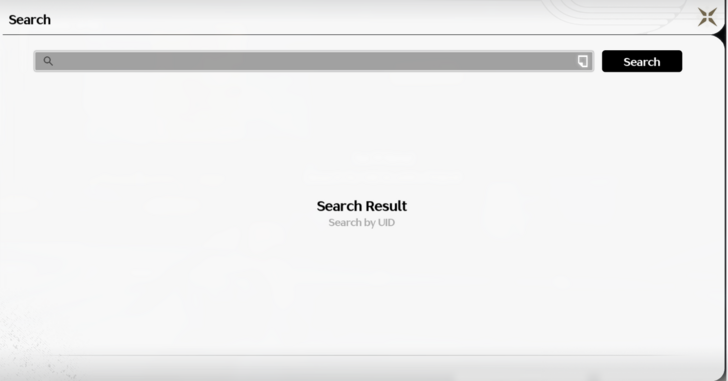
Find your friends by searching their account IDs in the Friends menu. Once their account pops up, send a friend request and wait for them to accept it.
ID is Unique Per Player
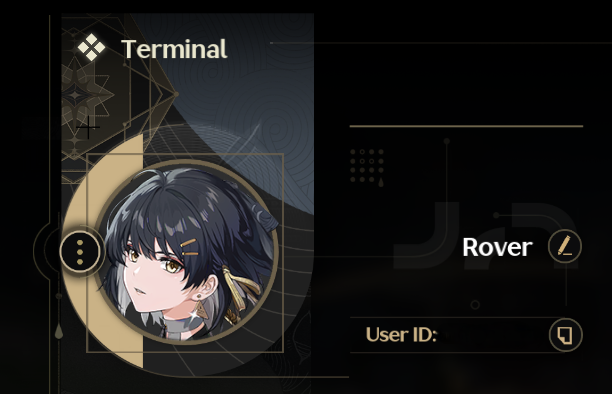
There is a special set of numbers that can be found in the main menu, under the Rover's current name. It can automatically copied to your clipboard by clicking on the paper icon on the right.
How to Invite Friends for Co-op
Find Them in Friends List

After the friend request is accepted, players can find their friend in the Friends List menu. If there are a lot of friends already added, players can use a search bar to find them easily.
Both Players Have to Be in Same Server
One thing to note is that in order to add your friends, both players have to be in the same server. Keep that in mind before selecting a server to join in, as game progress does not carry between servers.
Send Request to Join Their World
Once you have your friends added into your Friends List, look for them in the page and check first to see if they are currently online. If they are, you can send a request to join their world.
You will be transported to their world near them once accepted.
Or, Be Invited to a Friend's World
Another way is the vice versa--be sent an invite by a friend to join your own world. Once you accept, they will be appearing in your overworld shortly.
Benefits of Playing with Friends
Less Need To Swap Between Resonators
All players will be simultaneously active on the field during the field, allowing players to continuously attack the enemy.
When it is just two players, one of them will be controlling two Resonators that can swap as they please. However, when there are three total players in a group, no player can switch out between different Resonators.
Assistance in Playing if Difficulty is Hard
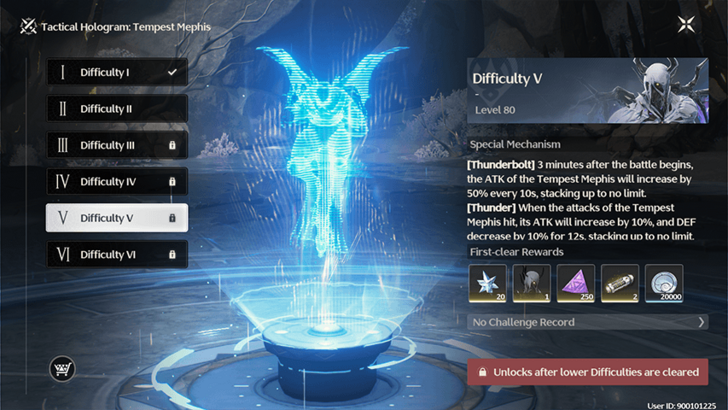
More experienced and leveled players can join in with players that are having difficulty clearing content, and help clear them to get stronger themselves.
Collecting Materials
Should you run out of resources to claim in the overworld, you can join in on another player's world and collect materials there too. That is, if that player has not collected said materials in the same location.
Wuthering Waves Related Guides

Beginner's Guide: Tips and Tricks
Tips and Tricks
Echo Guides
Puzzle Guides
Utilities
| Utilities | |
|---|---|
| All Utilities | Grappling Hook |
| Sensor | Waypoint |
| Casket Sonar | Levitator |
| Projector | Lootmapper |
| Camera | Ultrasonic Pulse Chip |
| New Flight Mechanics | - |
Unmarked Challenges
| Unmarked Challenges | |
|---|---|
| Unmarked Challenge Locations | How to Complete the Backflip Challenge |
| Travel in Jinzhou Gulpuff Challenge | Mingming and Doudou Hide And Seek |
FAQs



Author

How to Add and Play with Friends

Rankings
- We could not find the message board you were looking for.
Gaming News


![Ratatan Review [Early Access] | Hits the Right Beats](https://img.game8.co/4283109/ed5a8963f67e4cb2e6a83fd4232e3290.jpeg/thumb)

Popular Games

Genshin Impact Walkthrough & Guides Wiki
Hollow Knight: Silksong Walkthrough & Guides Wiki
Umamusume: Pretty Derby Walkthrough & Guides Wiki
Borderlands 4 Walkthrough & Guides Wiki
Wuthering Waves Walkthrough & Guides Wiki
Honkai: Star Rail Walkthrough & Guides Wiki
Pokemon TCG Pocket (PTCGP) Strategies & Guides Wiki
Pokemon Scarlet and Violet (SV) Walkthrough & Guides Wiki
Zenless Zone Zero Walkthrough & Guides Wiki
Clair Obscur: Expedition 33 Walkthrough & Guides Wiki









Recommended Games
Yu-Gi-Oh! Master Duel Walkthrough & Guides Wiki
Once Human Walkthrough & Guides Wiki
Fire Emblem Heroes (FEH) Walkthrough & Guides Wiki
Persona 3 Reload Walkthrough & Guides Wiki
Black Myth: Wukong Walkthrough & Guides Wiki
The Legend of Zelda: Tears of the Kingdom Walkthrough & Guides Wiki
Super Smash Bros. Ultimate Walkthrough & Guides Wiki
Monster Hunter World Walkthrough & Guides Wiki
Diablo 4: Vessel of Hatred Walkthrough & Guides Wiki
Elden Ring Shadow of the Erdtree Walkthrough & Guides Wiki










All rights reserved
Copyright© 2024-2025 Kuro Games. All Rights Reserved.
The copyrights of videos of games used in our content and other intellectual property rights belong to the provider of the game.
The contents we provide on this site were created personally by members of the Game8 editorial department.
We refuse the right to reuse or repost content taken without our permission such as data or images to other sites.
How do intro and outro skills work exactly in coop? I know you can still do them by clicking on your friends and ... something happens. Is it my into and my teammates outro, or the other way around?